Within XTruLink Settings, you may select the Altru delivery method to associate with your Web Portal, Kiosk, MPOS, and/or Access Control transactions. A delivery method is needed because Altru requires one in order to sync orders from our system. All Web, Kiosk, and MPOS XTruLink orders will receive a digital receipt from our system regardless of the delivery method you select.
Creating unique delivery methods can be a great way to tag XTruLink order types in Altru (i.e. specify kiosk vs. online).
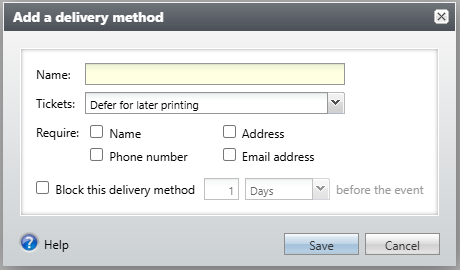
Please also note that we do not support delivery methods that are set to require address, name, or phone number in Altru. Delivery methods with these settings will not appear for selection in XTruLink. Our web portal will still require that information by default. Our kiosks and MPOS devices will require name and either phone number or email, or both.
Adding a New Delivery Method in Altru
To create a new delivery method in Altru, navigate to Tickets > Configuration > Delivery methods. Click Add, and leave all default settings as is. Provide a name and save. Do not check boxes to require data.
Updating Delivery Method in XTruLink
Once you have created your new delivery method, it will take time to sync over to XTruLink. To sync it over immediately, in XTruLink navigate to System > Settings > Data Sync Manager. Click 'Sync Now" next to the process "Non Essential Data." Once the sync is complete, you may update your kiosk/MPOS and/or online delivery method.
Update Kiosk/MPOS Delivery Method
- Go to Kiosk Sales > Configurations
- Select your configuration
- Select your designated delivery method from the dropdown menu on the Overview tab
Update Online Delivery Method
- Go to Online Sales > Portals
- Click edit next to your portal
- Select the Settings tab
- Select your designated delivery method from the dropdown menu
- Save and sync all changes
Update Member Entry (Access Control) Delivery Method
- Go to Access Control > Member Entry Profiles
- Click edit next to your profile
- Select your designated delivery method from the dropdown menu
How will this appear in Altru for reporting?
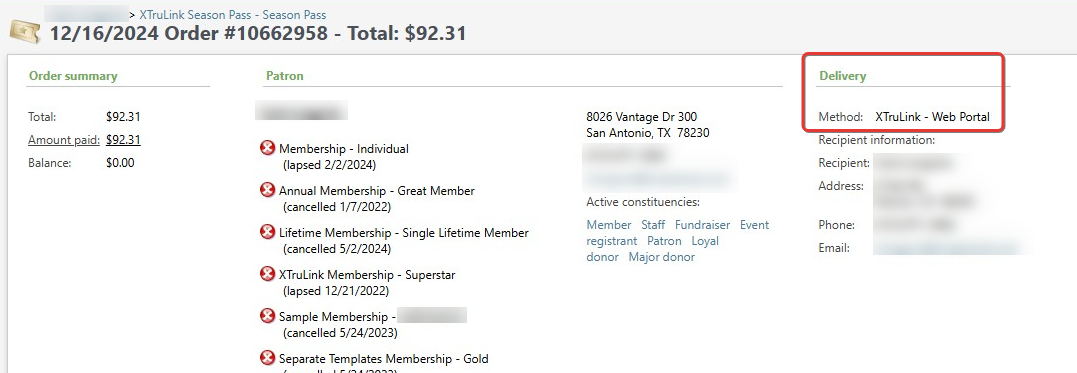
You will see the delivery method appear on the sales order in Altru, and will be able to query the data as well. Here is a sample of where you will see it at the top of the order page in Altru: